27 years of trusted school IT support across Hertfordshire and Buckinghamshire

Category: Google

  • Why so Many Schools are Shifting to Zero Trust Security

    Why so Many Schools are Shifting to Zero Trust Security

    The term “zero trust” doesn’t necessarily invoke a positive connotation. However, rephrased as “always verify,” the same principle takes on an entirely different sentiment. Semantics aside, it’s a serious security solution that schools can’t afford to ignore.

    Don’t want to join the millions of institutions who had their network breached from within last year? Perimeter defences are no longer enough to keep your student data safe. Enter: zero trust security.

    What is zero trust security?

    With zero trust, it doesn’t matter whether an individual or device is inside or outside the network; an identity verification is required from anyone looking to access data and applications on your school network.

    Since they don’t rely on network location, zero trust approaches authorise activity only after powerful authentication technology is able to verify a user. From that point, each grantee will only be able to access network resources based on their predetermined permissions. For instance, a technician would have the same access whether working from home or on site at different schools in the area.

    Educational institutions looking to better understand this IT security model may also choose to think of zero trust as a castle-and-moat analogy. In the dark ages, castles relied on moats and walls to keep intruders out. However, they also had watchmen standing guard in case someone were to successfully breach the castle walls. Zero trust works the same way. It doesn’t assume that the moat (firewall) alone will keep out the unwanted or trust everyone inside the gates (like traditional IT network security does). Instead, it employs defences at every level, including those on the inside.

    How does zero trust security apply to the classroom?

    By trusting individuals over networks, zero trust environments are more realistic for the demands of the modern classroom, especially hybrid and online classrooms.

    As Security Boulevard points out, “Zero trust cybersecurity focuses on securing your data rather than just the perimeter of your network. This approach secures your school’s data more effectively, regardless of the network or device a student, teacher or staff member is using. Taking this approach is particularly important for schools that are using remote or hybrid learning. In those environments, you have no way to know whether the networks that your users employ are secure or not.”

    How can schools use zero trust security?

    Said plainly, zero trust security protects schools from users on different networks and ensures educational institutions are prepared for emergencies.

    Presently, that means safeguarding school data regardless of device or end user. Again, Security Boulevard, “You may be in one of the schools that were able to scramble to full 1:1 for the 2020/21 school year. But, it’s impossible for you to know if everyone accessing your school’s Google Workspace [is] using their school-issued devices. It’s not unheard of for a student to leave a device at school, and then log in with their home computer to do homework.”

    Most pressingly, multiple layers of security offer schools peace of mind that their student, faculty and school data are safe. That generally means deploying the following security principles:

    • Continuous monitoring and validation
    • Least privilege
    • Device access control
    • Microsegmentation
    • Preventing lateral movement
    • Multi-factor authentication (MFA)

    Beyond identity and access management, all user activity and endpoints are closely tracked, monitored and flagged for any behavioural abnormalities.

    Like building a castle, constructing a zero trust environment can’t happen overnight. Still, the sooner school’s start laying the foundation for this comprehensive security solution, the safer everyone will be.

  • How the Right Tools Can Help With Educational Development

    When it comes to students’ educational development, it’s crucial that teachers are armed with the right resources. Over the past two years, the global pandemic has changed the way students learn, and the traditional classroom has evolved into a more digital-first space.

    This need has even received the attention of the Department of Education, which recently released a green paper that “includes a focus on guaranteeing that the ‘potential of technology’ is fully utilised to best accommodate every child’s unique needs.” With that change, it’s important for educators to stay current and understand the digital resources available.

    Fortunately, there is an abundance of tools online that can be accessed from anywhere and are free of charge. Whether you’re looking to enrich the overall learning experience for students or simply improve their chances of success, here are a few ways you can make the most of the tools at your disposal.

    Know Your Products

    It’s inevitable that students will spend a lot of time working online. In fact, research – which polled 2,700 students and 2,500 university leaders in the UK and around the world – shows that “more than four in five students (82%) said they wanted at least some of their course meetings to take place online, with two in five (41%) preferring fully online learning, with no in-person element at all.”

    From taking quizzes to completing assignments, more and more of the educational experience is digital today. So, it’s important to have a strong understanding of the products available to help set them up for success.

    Additionally, don’t be afraid to ask other educators at your school which tools they have found to empower students, and see how they may benefit your classes. Learn from them how to best instruct students to use these tools. There are also plenty of resources that can help students succeed. Having a strong lineup of products and programs that make learners feel confident using will help the entire classroom make the most of their time.

    Find the Right Tools

    Many free resources are available to educators online. Learn valuable skills like how to encourage critical thinking and organisational skills, utilise apps to help you spark creativity and create endless opportunities for students, and discover best practices to help engage your students’ families with their child’s learning experience.

    Seek Student Feedback

    School absences are soaring, which is why it’s crucial to keep students engaged. One of the best tools for their educational development is also the most simple. Seeking feedback from your students is a great way to understand where they might be struggling, and what they might need from you.

    Try to find students who have seen you teach the most and who have seen you teach the most and ask for their thoughts on their current curriculum. Don’t take offence to any constructive criticism; use it to improve processes and sharpen your skills.

    No matter what you teach, it’s always important to help students continue growing. Knowing what resources you have access to is an important first step in developing their minds. Don’t be afraid to ask others what tools worked for them either – then share your knowledge with others around you.

  • This Is What the Future of Classroom Safety Looks Like

    This Is What the Future of Classroom Safety Looks Like

    In today’s digital world, technology has made opportunities endless for students. Learning can happen from anywhere in the world, and teachers can provide their students with a more personalised education. In short, the future of education is here.

    It’s more important than ever for teachers to be aware of security trends and to be armed with the tools to keep their students safe in the classroom. This shift toward tech-enabled learning brings with it a myriad of safety and security challenges:

    • 73% of parents in the UK are concerned about their kids accessing inappropriate material online.
    • 37% of UK teachers have seen an online safety incident in their school.
    • 84% of parents and guardians worldwide report feeling worried about their children’s online safety.

    Empower the students where and how they learn


    With distance and hybrid learning here to stay…

    • Comprehensive security protections will become vital in ensuring that the continued shift to digital learning doesn’t compromise classroom security.
    • Unfortunately, many schools have struggled to stay a step ahead when it comes to cybersecurity, with many schools lacking the resources to implement security solutions. The result is a growing demand for a more proactive approach to these challenges.

    From platform-specific regulations to complex legislation…

    Making sense of the security landscape is challenging. Schools are looking for guidance on where to turn for the answers. Cybersecurity guidance and education need to be clearly communicated, personalised, and tailored on more of a localised scale.

    There isn’t a widely accepted domestic or international standard on how to be safe online. There are also barriers in navigating the array of policies and laws that are intended for different audiences.

    • 59% of educators and administrators say they either ‘aren’t sure’, or ‘haven’t received’ training or new cybersecurity initiatives for remote learning.
    • 54% of educators and administrators said budget is a medium or large barrier in strengthening their institution’s cybersecurity posture.

    Having a trusted partner…

    This is critical when it comes to navigating the complexity of cyber threats and security in the digital space. Allowing teachers to feel confident and comfortable with the technology their students are using is important, and Google for Education can help.

    With built-in security, rigorous compliance, and control and ownership of your data, Google for Education provides a safer way for everyone in your school community to engage and learn – students and teachers alike.

    Sources:

    1. Bringing online safety education programs to UK schools (2018)
    2. Growing Up Digital: A Report of the Growing Up Digital Task Force (2017)
    3. 84% of parents are worried about their child’s online safety (2019)
    4. IBM Education Ransomware Study (2020)
  • How to create a simple assignment in Google Classroom

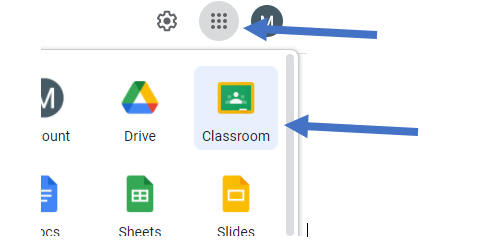
    1. Open Google Classroom via the waffle, or go to www.classroom.google.com and select your classroom

    1. Click the Classwork tab

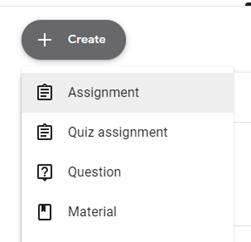
    2. Click Create > Assignment

    1. Upload an existing task, or create one directly within classroom

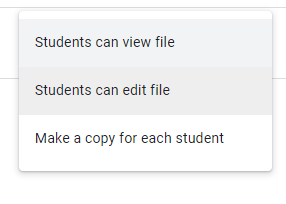
    2. Choose how pupil see the assignment

    • Student can view file – this is a view only copy
    • Students can edit file – this allows all students to collaborate on the same document
    • Make a copy for each student – this creates a copy of the document for each student
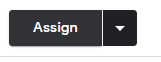
    1. Assign the work by clicking on Assign button

    tip: you can schedule the assignment to appear at a later date by clicking the drop-down button and select “schedule”

    1. When Pupil logs into Classroom, and click the Classwork tab they will see the assignment.

    2. When work is completed, they click TURN IN to hand the work back to teacher

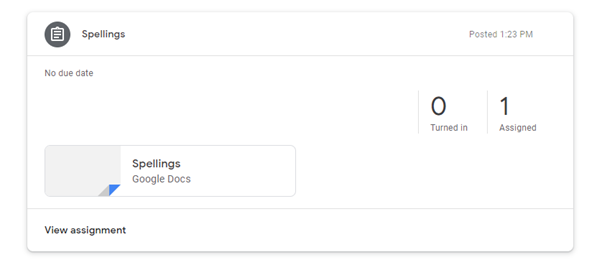
    1. Teacher can see how many pupils have handed work in