27 years of trusted school IT support across Hertfordshire and Buckinghamshire

Author: admin

  • Is Micro-Learning the Future of Professional Development?

    Between getting their classrooms ready, finalising lesson plans, and getting a head start learning all the incoming students’ names, teachers have a steep back-to-school ramp-up period. Throw in a gruelling, days-long professional development event and it’s likely to put them over the top.

    But what if the £260 million the UK spends annually on staff development could be concentrated into short, digestible training for skills that educators would actually use in their day-to-day life?

    That’s the goal of these micro-learning resources. They hyperfocus on the tech skills teachers need in our modern, hybrid learning-era classrooms.

    Where Conventional Teacher Training Falls Short

    Given how quickly teachers were expected to digitise the learning day, it’s understandable some of them may have different levels of comfort with the technologies that emerged.

    The problem is that most professional development programmes were created pre-pandemic. They’re long, monotonous, and don’t reliably move the needle on the tech skills teachers need to be practising. Particularly if they’re going to be expected to help students improve their own digital literacy.

    Is it really any surprise experts at Improving Teaching warn that only 45% of teachers believe their school’s professional development provision is helping them improve?

    How Micro-Credentialing is Different

    “A style of learning that is typically less than 3 minutes, content dense, and engaging, microlearning covers just one or two learning objectives. This style of learning comes in many formats including text, video and audio, or a combination of all three. Micro-learning can be incredibly powerful, providing concise, focussed and just-in-time content,” explains eLearning platform Academii.

    And, because many of these micro-learning mini-lessons, like those in the Google Workspace Certification programme, are self-paced, teachers are better able to fit professional development into their already hectic back-to-school schedules.

    It also gives educators ownership of what they learn and where they put their focus.

    Some teachers may already understand the fundamentals of using Google Workspace, but want to finetune those skills with a bit of advanced practise. Others may be struggling with how to keep the creative spark ignited in remote learning environments. Just a few short hours spent on a handful of focused units could help them learn how digital tools can support creativity, promote students’ voices, and increase engagement.

    Post-Certification Potential

    Once educators earn their Educator Certifications, it opens up numerous more opportunities to share that knowledge with their academic communities.

    The three most defined paths include becoming a:

    • Certified Trainer. Certified Trainers empower educators to learn and use Google for Education products to make their classrooms more efficient, improve student outcomes, and foster leadership skills. The trainers themselves get an impressive addition to their resumes as well as a secondary income stream.
    • Certified Coach. The Certified Coach program empowers instructional coaches to work 1:1 with educators and drive impactful technology use in their schools. Coaches get access to research-backed strategies and tools – so that new and veteran educators alike can transform instruction across every classroom.
    • Certified Innovator. The Google for Education Certified Innovator Program recognises and supports top educators who are excited to grow professionally, advocate for impactful technology, and innovate to improve classrooms, schools, and local communities. This track helps educators launch unique passion projects using technology to solve challenges in education.

    Educators instinctively know they need a particular set of tech skills to help students excel in a rapidly digital world. What’s less instinctive is which resources and training lessons are most essential from year to year. That’s where schools can help. By developing a rotating list of tools, they can help their educators master modern classroom concepts to drive digital and academic excellence.

  • How Tech Can Improve Teachers’ Professional Development

    Learning Never Stops

    Every teacher knows that learning never stops – not their students’ learning and not their own. However, how teachers can access resources for their professional development has shifted dramatically over the past few years, with greater opportunities for teachers to lead their individual personal development in ways – and in places – which suit them. While the pandemic posed huge challenges for educators around the world, some good has emerged in the teacher professional development space. Traditionally, professional development would involve teachers gathering together at a predetermined time and place, and a teacher’s ability to attend would depend on their ability to get there. Not to mention the immense workload they face: UK teachers on average work 11.2 hours of unpaid overtime a week. If that location was away from their usual place of work or involved additional travel time, certain groups could find themselves disadvantaged and, in some cases, unable to fully participate; stuck at home with immense piles of duties instead. Technology has changed that.

    Technology and Professional Development

    Tech providers like Google for Education have revolutionised how teachers can engage with – and lead – their professional self-development. Google for Education engages teachers from their starting points, whether they are new learners getting to grips with the basics, or whether they are more advanced learners ready to move beyond the fundamentals.

    How Tech Empowers Teachers

    So how does technology empower teachers? Easily – by enabling teachers to be in charge of their own professional development. Teachers are empowered to use the available tools to identify their strengths and areas of opportunity. Some educational continuing professional development providers – such as the British Council – also provide digital resources where school leaders can work with their staff to identify training pathways that both support the individual needs of the teachers as well as the needs of the educational institution, providing a common language and framework within which all needs can be met.

    Tech Helps in Keeping Track

    Another advantage of using professional development platforms to enhance teacher learning is that it is easier to keep track of the training that has been done, and the outcomes that have been achieved. Traditionally, teachers would leave in-person CPD sessions armed with paperwork and notes which could be easily lost or forgotten about. The advantage of tech-based professional development is that paper-based notes and handouts are not needed. Notes and materials can be kept digitally and referred to wherever the user can access the internet. When information is easily retrievable, then learning is much more powerful. It enables training to become embedded into practice far more quickly than it might have done otherwise.

    Tech-Based Training is Inclusive

    Just like students, teachers have a diverse set of needs themselves – and those needs may be visible or invisible. Meeting the needs of all teachers in a traditional CPD setting can be challenging, but tech alleviates many of the issues that can arise. The software used can ensure that the content is accessible to all, regardless of their needs. It can also be accessed at a time and place to suit the user, while encouraging and enabling collaboration. It can be common for staff members with additional caring responsibilities outside of the classroom to be unintentionally disadvantaged when a training course requires them to be in a specific place at a specific time. Allowing them to complete the training at a time convenient to them increases the likelihood of professional development. One great example of this is the Ofsted framework, which requires leaders and managers to understand and take into account the main pressures on staff. Learning isn’t just reserved for students. With the right tech, teachers can continue to take their careers even further – and expand their knowledge. By harnessing the right resources, both schools and teachers can benefit from where new advancements can take them.

  • Performing a Full System Scan

    If you think you may be the victim of computer malware or a virus, please perform a full system scan as soon as possible. This could be because you have stumbled across a nasty site that automatically downloads software to your computer or more likely, have received an email that looks legitimate, but isn’t. If you opened an attachment, then please perform a scan. If you were asked to enter a password and did, then you should change your password as soon as possible.

    Below are 2 methods to run a full system scan on a Windows device depending on whether you are using McAfee or Sophos anti-virus.

    McAfee

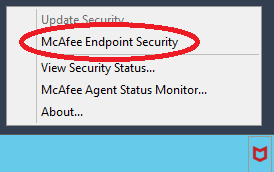
    If you are using McAfee, then you should see the icon in the lower right of your screen. (You may need to click on the up arrow to reveal it.)

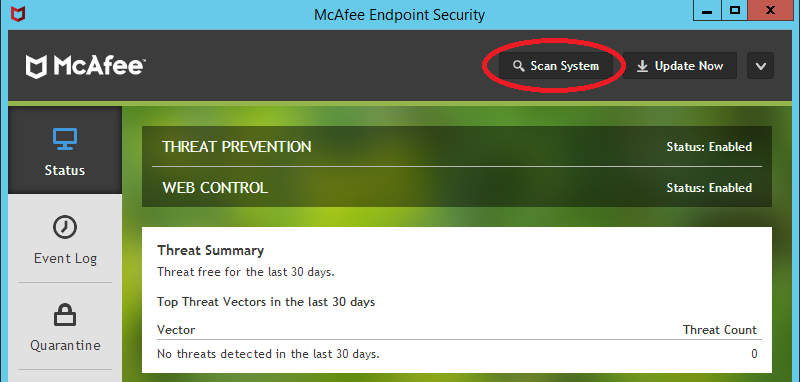
    Click on the McAfee icon and select McAfee Endpoint Security**

    Select Scan System**

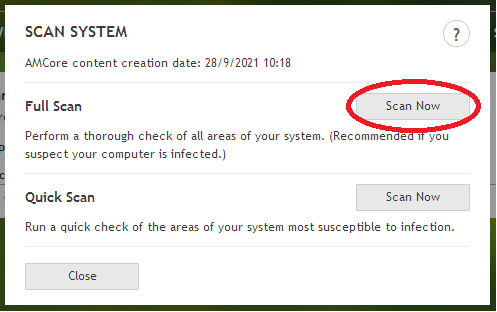
    Choose the type of scan you want. We recommend a full scan. Click on Scan Now, in the Full Scan section.

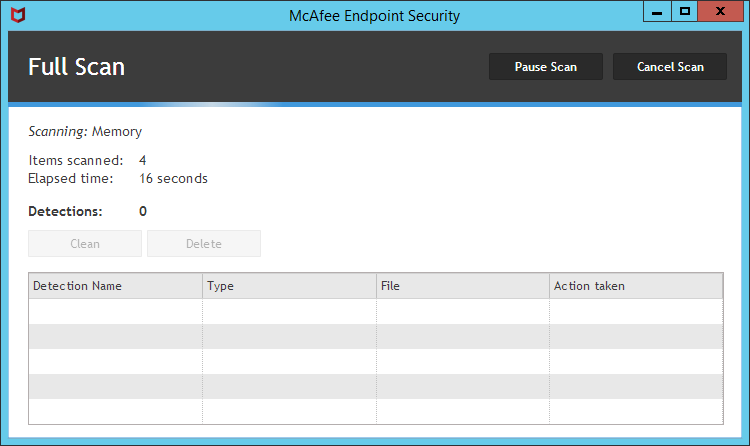
    McAfee will now scan your system for any threats it is able to recognise. This will take some time. You can work while this is completing. Check progress every now and then to see when it finishes and if it finds anything. If it detects anything then do let us know immediately.

    Sophos

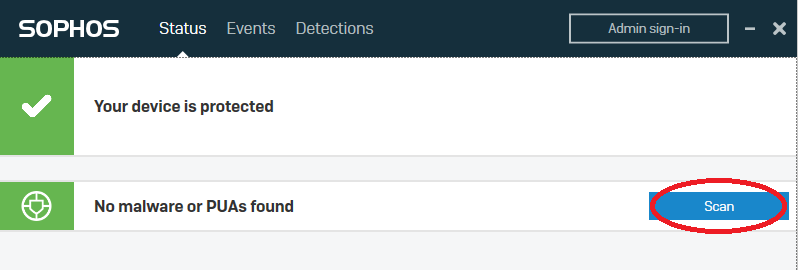
    If you are using Sophos, then you should see the icon in the lower right of your screen. (You may need to click on the up arrow to reveal it.)

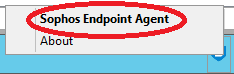
    Right-click on the Sophos icon and select Sophos Endpoint Agent**

    Select Scan**

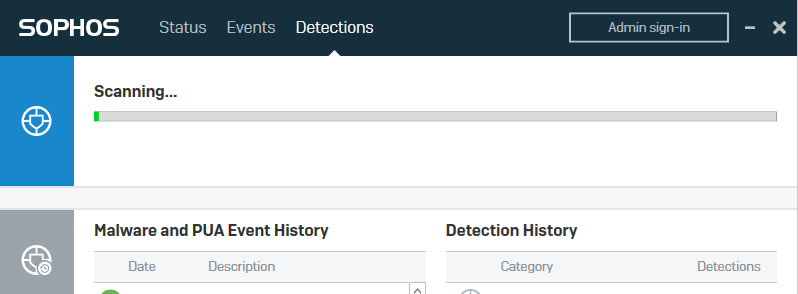
    Sophos will now scan your system for any threats it is able to recognise. This will take some time. You can work while this is completing. Check progress every now and then to see when it finishes and if it finds anything. If it detects anything then do let us know immediately.

  • Is Adaptive Learning the Solution to One-Size-Fits-All Ed?

    The best teachers are the most attuned ones. Without them saying a word, they can tell when a student is close to working out a new concept or just plain stuck. And they instinctively know how to tailor their instruction accordingly: throwing out clues to lead learners to the right answer or slowing down the pace to provide a little extra process time. They may even change up tasks partway through to refocus a neurodiverse student or ensure an advanced learner doesn’t get bored.

    Educators are nothing if not adaptable, but it’s a huge ask for them to simultaneously give every learner in a classroom their full focus. For that, classrooms need adaptive technologies that centre the student experience.

    What is Adaptive Learning?

    Global Digital Learning defines adaptive learning as “the delivery of education or training that utilizes technology and data to provide an individually customized learning program to students, intelligently adapting to their learning needs.” Basically, it’s the opposite of a one-size-fits-all educational model.

    With classroom sizes and educator burnout rates both increasing, schools are having to get creative in how they meet student needs. Adaptive technologies act as the ultimate teacher’s assistant. They make sure every learner gets the benefit of individual instruction, even when teachers can’t give them their immediate or undivided attention.

    Designed vs. Algorithmic Adaptivity

    The best learning tools still follow the best teaching methods. Adaptive learning technologies simply take what teachers already do well and help them scale it.

    There are two ways adaptive teaching tech helps students connect with new material:

    • Designed adaptivity tools rely heavily on teacher planning. Instructors sequence the lessons based on experience. Real-time feedback is provided by the technology based on an “if this, then that” methodology. The model works well for educators who want more say in how the student learns.
    • Algorithmic adaptivity approaches use rulesets to curate content as a student learns. It takes into account what they show an understanding of and what tasks are most appropriate to follow up others.

    What Does Assisted Learning Look Like in the Classroom?

    Imagine you’re a student stuck on a math problem. With 25 other students in your class, you can’t always get immediate help, leaving you frustrated and diminishing your confidence to complete future problems. Now imagine a different scenario. You’re stuck on a problem, but instead of growing frustrated, you receive a helpful hint or video that gives you exactly what you need to unblock you. You realise what you need to do differently, complete the math problem correctly, and feel more confident in your ability to learn.

    From there, the reinforced learner becomes reengaged, sparking their intrinsic motivation to master even the most difficult concepts.

    All students deserve continuous access to customised educational resources that can meet them where they’re at. Adaptive learning tech satisfies this need without putting an undue burden on teachers and uplifting everyone.

  • How to Find the Right Tech for Your Teaching Style

    How to Find the Right Tech for Your Teaching Style

    Whether they’ve been an educator for decades or this is their first year, every teacher has their own teaching style. Everything from the way an educator communicates with students to the subject matter being taught can impact an educator’s style.

    Thanks to modern technology, there are a lot of resources now available to complement any style of teaching and allow teachers to work collaboratively with their students from anywhere. So how do educators find the right tech for their style? It’s important for teachers to know what’s available to them and then determine how it may benefit their classroom.

    Digital Tools Built for Collaboration

    It’s crucial that today’s students are well-versed in collaboration, especially given that educators predict that “the 2025 [higher education] learning model will be a hybrid one, combining online and in-person studies.” In order to prepare students for the future, it’s important to get them collaborating now.

    Resources like Google are known for their digital tools, including tech like Sheets, Classroom, Forms, Assignments, and Slides. These Google for Education products can help teachers create classroom presentations, build surveys, manage coursework, and so much more.

    And it’s not just students who benefit. Research suggests that “opportunities for teacher collaboration are a key feature of school environments where teachers have higher job satisfaction and continue to develop their effectiveness over time.”

    Even more, these tools are collaborative and can be accessed from home or the classroom, making them ideal for today’s modern educational environment.

    Choosing the Right Device for Teaching

    Finding the perfect device that will help elevate the education experience for their students is an important task for educators. For teachers who prefer to work digitally, there are plenty of devices designed for high-performance tasks such as coding and creating content.

    With many schools offering a hybrid learning environment or total remote learning, students (and teachers) are often being provided with devices by the school to ensure a cohesive learning experience. It’s important that these devices can be used both inside and outside of the classroom. This allows both students and teachers the flexibility of working when and where they want.

    Online Training Opportunities for Educators

    To help educators feel empowered, it’s imperative that they be fully trained on the technology being used inside the classroom. Fortunately, there are several training courses available online for learners of all levels that will help them make the most of their tech. From the basics of content creation to more detailed topics like cloud sharing, these courses were designed to support the work that educators are doing in the classroom and beyond.

    Technology Training Session You Can Use Today

    For teachers who are hoping to ease into introducing new technology to the classroom, there are a number of resources available that can be utilised today. These tools are meant to inspire creativity, encourage hands-on learning, and allow teachers to equip students with digital skills. From online lesson plans to an internet safety resource to apps that can be used with online products, teachers can immediately use these tools to get the most out of their technology.

    Take Learning to the Next Level

    If you learn best in a community environment, there are in-person groups where you meet with other educators looking to educate themselves on the right tech for their classrooms. In these groups, you can engage with fellow educators for no cost and share, collaborate, and support each other in using technology in impactful ways with students.

    In the UK, educators can join GEG UK, which describes itself as “an all voluntary Google Educator Group (GEG) members helping to inspire educational communities and help young people develop vital digital skills, across the UK.”

    Finding technology that complements your teaching style may feel like an overwhelming task, but there are many resources available to help. With the right tools in hand, it’s easy to elevate the education of your students and create a better learning experience for all.

  • Installing/Upgrading Target Tracker SIMS Report Template

    Download the template

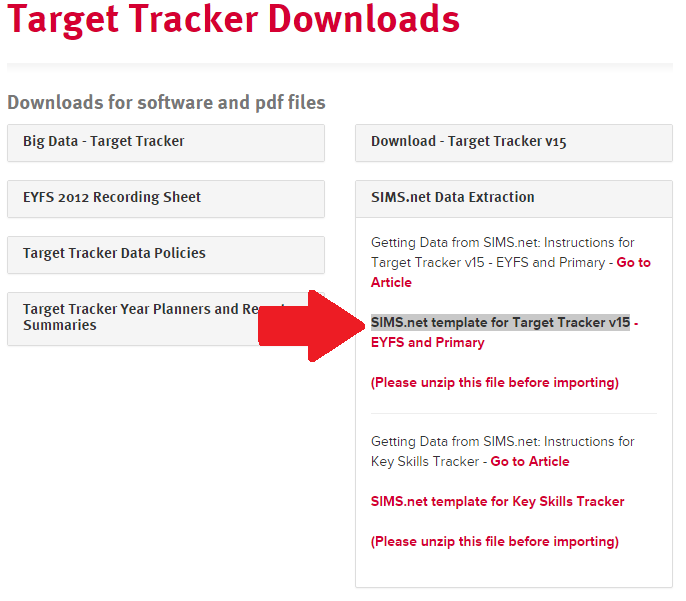
    Browse to the website www.eesforschools.org/targettracker/downloads and click on “SIMS.net Data Extraction”. Click on the current “SIMS.net template for Target Tracker” link to download the template as highlighted in the picture below

    tt template download v2

    After downloading the file will need to be unzipped. Do this by double clicking the zipped folder and then clicking Extract All Files. Make a note of where the file is being extracted to and then follow the instructions.

    From the example pictured above, the extracted file would be called “TT_V15_Pupil_Update.RptDef”

    To import the template

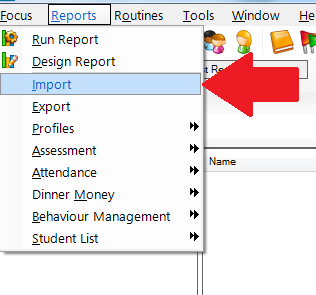
    From the Main Screen in SIMS.net select Reports – Import report as pictured below:

    import template v2

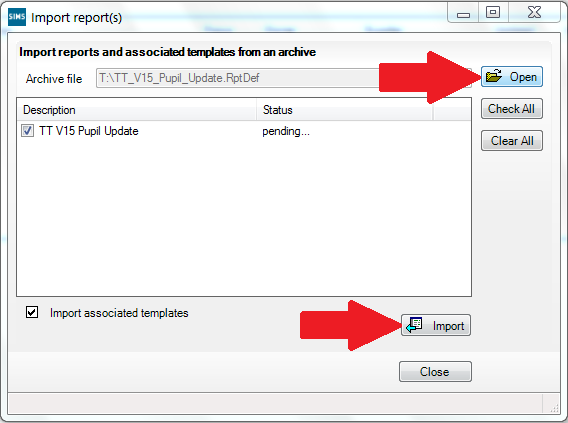
    Click the Open button and browse to the location of the template file as pictured below. This will be the location we noted before after unzipping, click on the file and click Open.

    import template open v2

    Click on the Import button to Import the file. When imported close this window. The report template will now be available from SIMS reports.

  • Updating Target Tracker Pupils Details

    Check the current template version online

    Browse to the website www.eesforschools.org/targettracker/downloads and click on “SIMS.net Data Extraction”. Make a note of the version of the template as highlighted in the picture below. In the pictured example the version would be 15.

    tt template download v2

    To generate the report

    From the Main Screen of Sims select Reports – Run report.

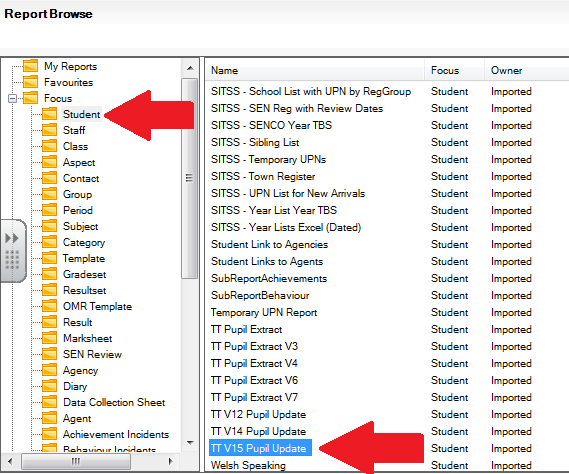
    In the Report window select Focus / Student, scroll down to the bottom of the list as pictured below:

    sims template v2

    Compare this with the version we noted from the website previously. If the version in sims is less than noted or no TT report exists at all, please follow the instructions in the “Installing/Upgrading TT template” document available HERE

    Click on the newest TT report and then click on the Run button. An example of the newest TT report is highlighted in the picture above.

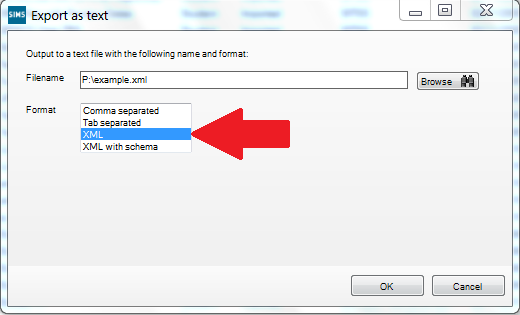
    After clicking Run the “Export as Text window” will popup as pictured below:

    export v2

    Click on browse, go to a location of your choice and enter a name for the file and save it. Leave as the default type which is an xml file, then click OK on the 2 messages that pop up to confirm the file has been exported.

    This file can then be used to update Target Tracker databases with contextual data, it will not update any assessment data.

    Importing the file into Target Tracker

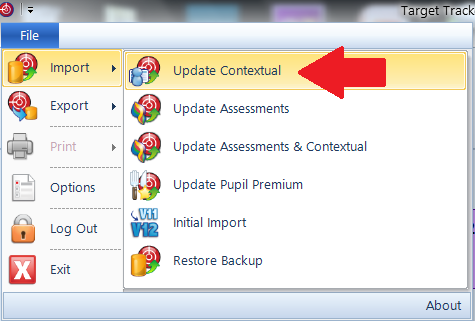
    Log into Target Tracker as an Admin user, click on File – Import – Update Contextual as pictured below:

    update context v2

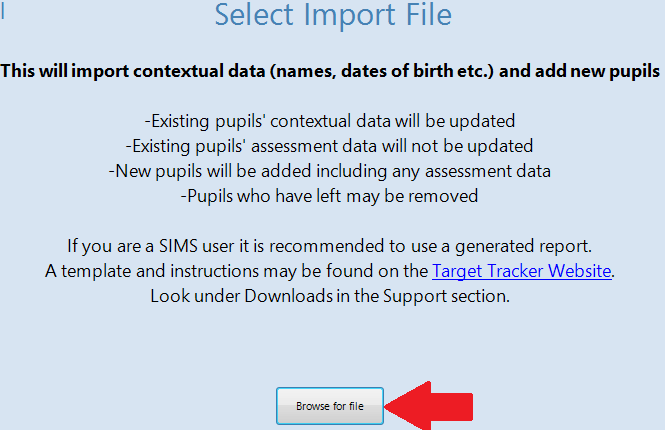
    The update contextual screen will appear as pictured below. Click the “Browse for a file” button and select the SIMS report from the location chosen previously and open it.

    update con browse v2

    Children highlighted in red will be removed and in green will be added. Everyone else will be updated, the updated data is highlighted in orange. Take care to check the leavers and new children carefully before continuing and completing the import.

  • Finding the True Value of Education Plus

    Google commissioned Forrester Consulting to conduct a Total Economic Impact (TEI) study and examine the potential return on investment (ROI) for education organisations.

    After investing in Education Plus, organisations will experience vastly improved security and ease of IT management, as well as improved collaboration and functionality for educators.

    Education Plus Benefits by the Numbers

    Improved Security

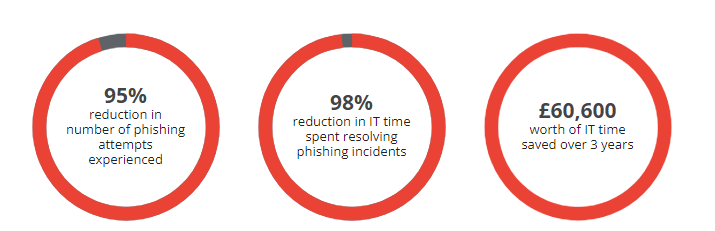
    Education Plus helped to strengthen security, simplify management and improve collaboration. Organisations were able to enable employees to become more efficient in administration, and consolidate legacy third-party applications and software.

    Time usually spent searching for and deleting phishing emails and resolving incidents saved 35 weeks of IT time*

    Increased Production

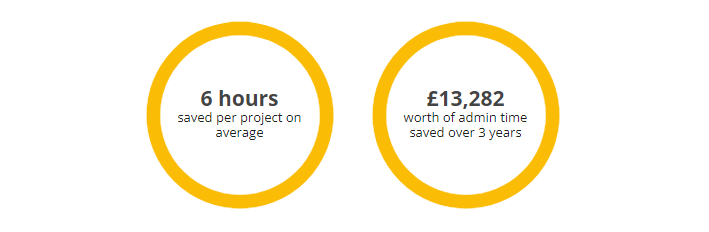
    Google Workspace for Education Plus is the most comprehensive edition, incorporating advanced teaching, learning, and security capabilities. Admin staff can create administrative, educational, and security reports 80% faster.

    ROI Breakdown

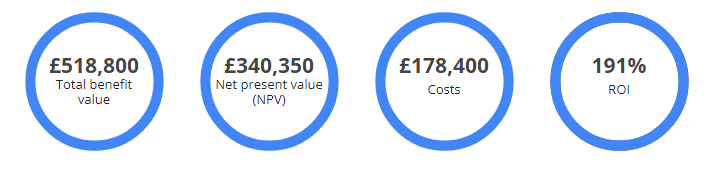
    The study shows Education Plus delivers a strong return on investment (ROI). Over three years:

    Lowering the Costs and Labour

    Organisations in Europe overcome struggles with securing their environments, overseeing cumbersome IT processes, and using inefficient communication. Review the entire report here.

    Forrester found the composite organization saved the team a total of 1,397 labour hours per year, which at 40 hours/week would be the equivalent of 35 weeks for one FTE.

  • How the Right Tools Can Help With Educational Development

    When it comes to students’ educational development, it’s crucial that teachers are armed with the right resources. Over the past two years, the global pandemic has changed the way students learn, and the traditional classroom has evolved into a more digital-first space.

    This need has even received the attention of the Department of Education, which recently released a green paper that “includes a focus on guaranteeing that the ‘potential of technology’ is fully utilised to best accommodate every child’s unique needs.” With that change, it’s important for educators to stay current and understand the digital resources available.

    Fortunately, there is an abundance of tools online that can be accessed from anywhere and are free of charge. Whether you’re looking to enrich the overall learning experience for students or simply improve their chances of success, here are a few ways you can make the most of the tools at your disposal.

    Know Your Products

    It’s inevitable that students will spend a lot of time working online. In fact, research – which polled 2,700 students and 2,500 university leaders in the UK and around the world – shows that “more than four in five students (82%) said they wanted at least some of their course meetings to take place online, with two in five (41%) preferring fully online learning, with no in-person element at all.”

    From taking quizzes to completing assignments, more and more of the educational experience is digital today. So, it’s important to have a strong understanding of the products available to help set them up for success.

    Additionally, don’t be afraid to ask other educators at your school which tools they have found to empower students, and see how they may benefit your classes. Learn from them how to best instruct students to use these tools. There are also plenty of resources that can help students succeed. Having a strong lineup of products and programs that make learners feel confident using will help the entire classroom make the most of their time.

    Find the Right Tools

    Many free resources are available to educators online. Learn valuable skills like how to encourage critical thinking and organisational skills, utilise apps to help you spark creativity and create endless opportunities for students, and discover best practices to help engage your students’ families with their child’s learning experience.

    Seek Student Feedback

    School absences are soaring, which is why it’s crucial to keep students engaged. One of the best tools for their educational development is also the most simple. Seeking feedback from your students is a great way to understand where they might be struggling, and what they might need from you.

    Try to find students who have seen you teach the most and who have seen you teach the most and ask for their thoughts on their current curriculum. Don’t take offence to any constructive criticism; use it to improve processes and sharpen your skills.

    No matter what you teach, it’s always important to help students continue growing. Knowing what resources you have access to is an important first step in developing their minds. Don’t be afraid to ask others what tools worked for them either – then share your knowledge with others around you.

  • Transform Your School with Chromebooks

    Chromebooks allow teachers to educate students even when they aren’t in the same room together. Chromebooks include accessibility right out of the box, unlocking learning experiences for students with diverse needs, abilities, and learning styles.

    This means that Chromebooks can seamlessly access Google Workspace for Education’s productivity and collaboration tools, as well as apps available in the Chromebook App Hub, Google Play Store, and content across the entire web.

    • Managed access puts IT in control of what users access
    • Simplified deployment gives IT access to device policies
    • Advanced security ensures school data is always safe
    • 24/7 IT admin support at no additional cost

    Open a world of opportunities.

    With Chromebooks, schools around the world are investing in their students’ futures through next-generation learning technology that fits easily within their budgets.

    • 53% lower cost per device
    • 57% lower total cost of ownership
    • 59% less management per device

    Source: IDC, “The economic value of Chromebooks for education”, January 2020

    Start transforming your school with Chromebooks

    Explore Chromebook’s total cost of ownership for education

    If you’re looking for Chromebooks to advance education at your institution, explore their economic value and total cost of ownership.

    Try out the Chrome OS Readiness Tool

    Did you know some Windows devices in your organisation can run Chrome OS? Find out which ones with our free and private readiness tool.

    • Assess which Windows devices can become Chromebooks
    • Get started

    Ideal for one-on-one environments, these Chromebooks can be sent home with students to extend learning beyond the classroom. Discover devices optimised for large video conference calls, note-taking, and running productivity applications simultaneously.

    At-a-glance features

    • Best for classroom and distance learning
    • Use with Google Workspace for Education and video conferencing concurrently
    • Minimum system requirements: 4GB RAM, CPU (Intel: Celeron N4020 / 4100 / 4120 / 4500 / 5000 / 5100 / 6000, AMD: Athlon 3050C, 3150C, 3015Ce, MTK: 8183 / 8192, QC: 7c)